import readline
import sys

sys.stdout.write("question? ")
while True:
    try:
        print raw_input(" \b")
        break
    except EOFError:
        pass
    except KeyboardInterrupt:
        break
Tuesday, December 03, 2013
How to make Python raw_input ignores Ctrl-D
The way to do this is to have a while loop around raw_input, and not print the question again in the next iteration. However, because of this Python bug http://bugs.python.org/issue12833, raw_input() or raw_input('') will erase the previous printed question in stdout output with a backspace. A workaround will be needed. Then, there's also a problem with Ctrl-D after you input something...
Here's the code to handle Ctrl-D and quit at Ctrl-C without the stacktrace:

Monday, July 22, 2013
Syntax error near unexpected token LIBHTPMINVERSION PKG_CHECK_MODULES in Ubuntu
When compiling suricata 1.4.1 fresh in Ubuntu, after apt-get install all the necessary dependencies, you may see this:
syntax error near unexpected token `LIBHTPMINVERSION,'
`        PKG_CHECK_MODULES(LIBHTPMINVERSION,
export ACLOCAL_FLAGS="-I /usr/share/aclocal"Thursday, July 11, 2013
Monkey patch (mock) the built-in raw_input function
For testing without mock (thirdparty or 3.x), I wrote a mock context manager function for raw_input. If you do not provide enough response in the mock_raw_input argument list, the raw_input is back to normal.
import __builtin__
import sys
from contextlib import contextmanager

@contextmanager
def mock_raw_input(*input_list):
    """Monkey patch the raw_input()"""
    _raw_input = __builtin__.raw_input
    def _stub(prompt='', input_iter=iter(input_list), orig=_raw_input):
        try:
            _input = next(input_iter)
            sys.stdout.write(prompt)
            return _input
        except StopIteration:
            __builtin__.raw_input = _raw_input
            return raw_input(prompt)
    __builtin__.raw_input = _stub
    try:
        yield
    finally:
        __builtin__.raw_input = _raw_input

def main():
    with mock_raw_input('abc','cde'):
        print raw_input('abc?\n')
        print raw_input()
        print raw_input('no more expected value? ')
    raw_input('raw_input should be back to default here, right? ')

if __name__ == "__main__":
    main()
Friday, March 22, 2013
Socket.IO 0.9.x client disconnect failed when using namespace
socket.disconnect() used to be working with my server. Then I changed my server to be using namespace, and the client side disconnect no longer works. Luckily I can find this from Google.
socket.socket.disconnect()
Thursday, March 21, 2013
Click a button to print an embedded PDF file without the printing dialog in Internet Explorer (silent print)
I recently helped a friend implementing a button to click, and it sends a hosted pdf to the defaulted printer without the printing dialog in IE8. I googled this about a few dozen pages and finally came across http://stackoverflow.com/questions/975652/silent-print-a-embedded-pdf. So here is the test.html. And due to the ActiveX used, you have to make this page to be trusted or in intranet.
 <html>
 <head>
 <title>Test</title>
 <script>
 function printpdf(pdf_path) {
  // remove the previous pdf <object> if existed
  var elem = document.getElementById("pdf");
  if (elem) {
   elem.parentNode.removeChild(elem);
  }
  document.body.insertAdjacentHTML('beforeEnd', '<object id="pdf" classid="clsid:CA8A9780-280D-11CF-A24D-444553540000" width="0" height="0"><param name="src" value="' + pdf_path + '"/></object>');
  pdf.printAll();
  return false;
 }
 </script>
 </head>
 <body>
 <!-- http://stackoverflow.com/questions/975652/silent-print-a-embedded-pdf -->
 <button onclick="printpdf('sample.pdf');">Print PDF</button>
 </body>
 </html>
Wednesday, February 20, 2013
Python datetime timestamp conversion between timezones
Recently, I needed to deal with some datetime/timestamp conversion between timezones in Python.
from datetime import datetime, timedelta
from dateutil import tz

utc = tz.tzutc()
local = tz.tzlocal()

# http://stackoverflow.com/questions/8777753/converting-datetime-date-to-utc-timestamp-in-python/8778548#8778548
def to_timestamp(dt_in_utc, epoch=datetime(1970, 1, 1, tzinfo=utc)):
    td = dt_in_utc - epoch
    return (td.microseconds + (td.seconds + td.days * 24 * 3600) * 10**6) / 1e6

# datetime to utc, if the datetime has no tzinfo, treat it as local
def to_utc(dt):
    if dt.tzinfo is None:
        dt = dt.replace(tzinfo=local)
    return dt.astimezone(utc)

# utc timestamp to datetime
def to_datetime(timestamp, tz=local):
    return datetime.utcfromtimestamp(timestamp).replace(tzinfo=utc).astimezone(tz)
Wednesday, December 19, 2012
Solaris x86 VM nanosecond hangs fix
For backup purpose, these two settings for vmware were found, that fixes some JUnit tests with locks.
monitor_control.disable_tsc_offsetting = "TRUE"
monitor_control.disable_rdtscopt_bt = "TRUE"
Thursday, August 02, 2012
Ubuntu Chrome Flash fast forward in Youtube
I found a workaround in http://ubuntuforums.org/showthread.php?t=2020021. Basically you just need to disable one of the flash plugins. To me, I found 11.2 r202 is working better for me.
Remember to click Details to show these two entries:


Friday, July 08, 2011
Chrome Extension Proxy Switchy! Auto Switch Mode workaround
From here and the reviews here, it's reported the Auto Switch Mode in the Proxy Switchy! Chrome Extension is not working after the recent Chrome updates.
Here is the workaround:
1. Have a working Proxy profile e.g. "Home" in my configuration, and with all the rules.
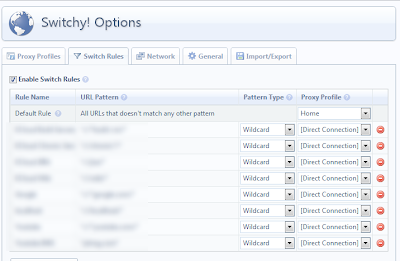
2. Enable Auto Switch Mode
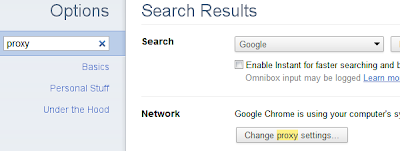
3. Open up Internet Options, the easiest way is to go through Chrome's options menu by searching "proxy" as the keyword, and click the "change proxy settings".
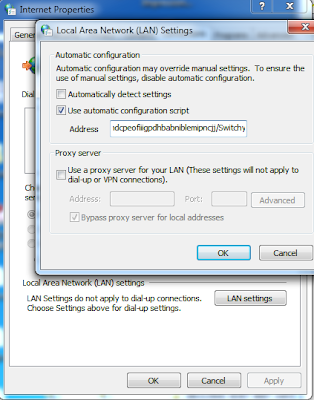
4. Click "LAN settings", don't worry about your checked boxes are not matching mine, the key is to copy the string inside the Address textbox into clipboard (select the text and press Ctrl+C). The string should be ended with "/SwitchyAuto.pacc?(numbers)".
5. Now go back to Switchy! Options and add a new Profile named "AutoProxy" (you can name it whatever you want). Select "Automatic Configuration" and paste the string copied from #3 into the "Auto Config URL". IMPORTANT: remove the "c?(numbers)" at the tail of the string to make it ended with "/SwitchyAuto.pac".
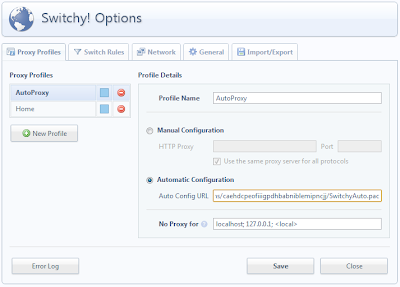
6. The last step is to activate (select) the AutoProxy profile. It should be working now.
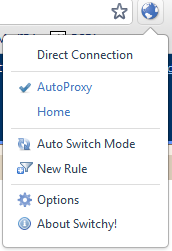
Important notes: If you change the rules, you need to activate the "Auto Switch Mode" and then, reselect the AutoProxy profile. The reason is that, by cycling through the Auto Switch Mode, the content in SwitchyAuto.pac will be updated with the new rules.
If I don't see your comments, please email me at kwong.matthew@gmail.com if you need help.
Here is the workaround:
1. Have a working Proxy profile e.g. "Home" in my configuration, and with all the rules.

2. Enable Auto Switch Mode
3. Open up Internet Options, the easiest way is to go through Chrome's options menu by searching "proxy" as the keyword, and click the "change proxy settings".

4. Click "LAN settings", don't worry about your checked boxes are not matching mine, the key is to copy the string inside the Address textbox into clipboard (select the text and press Ctrl+C). The string should be ended with "/SwitchyAuto.pacc?(numbers)".

5. Now go back to Switchy! Options and add a new Profile named "AutoProxy" (you can name it whatever you want). Select "Automatic Configuration" and paste the string copied from #3 into the "Auto Config URL". IMPORTANT: remove the "c?(numbers)" at the tail of the string to make it ended with "/SwitchyAuto.pac".

6. The last step is to activate (select) the AutoProxy profile. It should be working now.

Important notes: If you change the rules, you need to activate the "Auto Switch Mode" and then, reselect the AutoProxy profile. The reason is that, by cycling through the Auto Switch Mode, the content in SwitchyAuto.pac will be updated with the new rules.
If I don't see your comments, please email me at kwong.matthew@gmail.com if you need help.
Sunday, October 03, 2010
Writing your own shell… stuck on pipes?
I spent several hours nail down how to do pipe if you are writing your own shell. Most of the online reference is focusing 2 commands only. Here is the example of having 3 commands pipe together: ls -al | sort | cat -n
You can easily refactor this to a recursive function. Pay attention to not have the waitpid/wait() at the first and second command, or your child processes will block at wait.
#include <stdio.h>
#include <stdlib.h>
#include <sys/wait.h>
#include <unistd.h>

static const int PIPE_READ = 0;
static const int PIPE_WRITE = 1;

int main(int argc, char **argv)
{
    int status;
    int fd[2];
    pid_t pid;

    pid = fork();
    if (pid == 0) {

        pipe(fd);
        if (fork() == 0) {
            dup2(fd[PIPE_WRITE], STDOUT_FILENO);
            close(fd[PIPE_READ]);
            close(fd[PIPE_WRITE]);

            pipe(fd);
            if (fork() == 0) {
                dup2(fd[PIPE_WRITE], STDOUT_FILENO);
                close(fd[PIPE_READ]);
                close(fd[PIPE_WRITE]);
                execlp("ls", "ls", "-la", NULL);
            } else {
                dup2(fd[PIPE_READ], STDIN_FILENO);
                close(fd[PIPE_WRITE]);
                close(fd[PIPE_READ]);
            }

            execlp("sort", "sort", NULL);
        } else {
            dup2(fd[PIPE_READ], STDIN_FILENO);
            close(fd[PIPE_WRITE]);
            close(fd[PIPE_READ]);
        }

        /* IMPORTANT: don't add any wait/waitpid here */
        //waitpid(pid2, &status, 0);

        execlp("cat", "cat", "-n", NULL);
    }
    waitpid(pid, &status, 0);
    return EXIT_SUCCESS;
}
You can easily refactor this to a recursive function. Pay attention to not have the waitpid/wait() at the first and second command, or your child processes will block at wait.
Subscribe to:
Posts (Atom)